
How to Fix: Laravel Log Could Not Be Opened in Append Mode
Naka-encounter ka ba ng error na 'laravel log could not be opened in append mode'? Karaniwan itong nangyayari sa Linux servers during deployment dahil sa permission issues. Ayusin natin ito step by step.
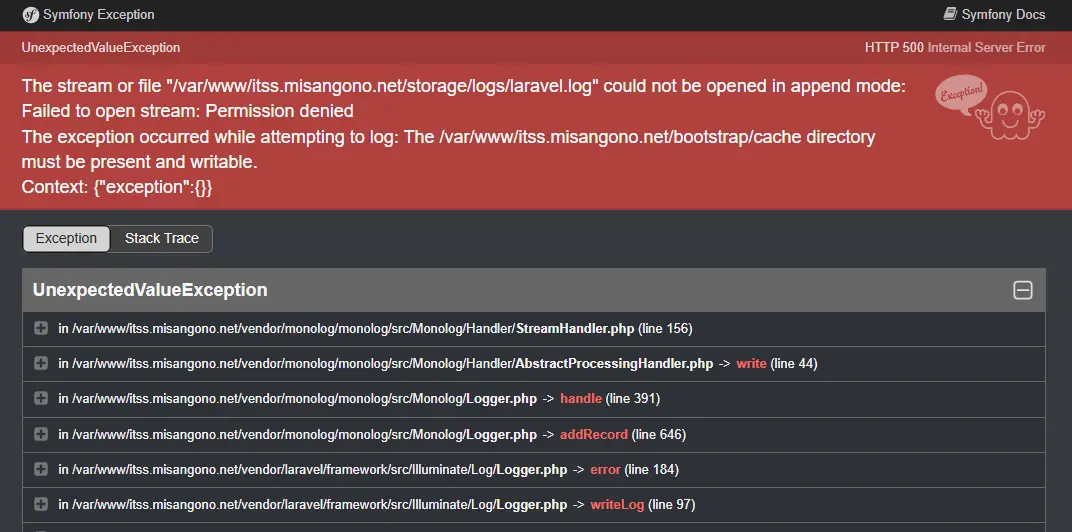
Ang error na “laravel log could not be opened in append mode” ay madalas lumabas kapag nag-deploy ka ng Laravel application sa Linux server (Ubuntu, Debian, etc.).
Hindi ito Laravel bug.
Most of the time, file permission at ownership issue lang talaga siya.
👉 This fix also applies sa ibang related errors tulad ng:
file_put_contents(/var/www/...): failed to open stream: Permission denied
Kailangan ni Laravel (at PHP in general) ng write access sa mga following folders:
storage/bootstrap/cache/
Quick Fixh2
sudo chown -R $USER:www-data /var/www/<your-project>/storagesudo chown -R $USER:www-data /var/www/<your-project>/bootstrap/cache
sudo chmod -R 775 storagesudo chmod -R 775 bootstrap/cache
Command Explanationh2
sudo chown -R $USER:www-data /var/www/<your-project>/storageh3
chown– change owner ng files at folders-R– recursive (kasama lahat ng laman sa loob)$USER– ikaw bilang current userwww-data– web server user (Apache / Nginx)
👉 Result:
Ikaw at ang web server parehong may access sa storage folder.
sudo chown -R $USER:www-data /var/www/<your-project>/bootstrap/cacheh3
Same concept as above, pero para sa bootstrap/cache.
Required ito para sa config cache, route cache, at optimized files ni Laravel.
sudo chmod -R 775 storageh3
chmod– change file permissions775–- Owner: read, write, execute
- Group: read, write, execute
- Others: read, execute
Ito ang recommended permission para magkaroon ng write access si Laravel habang safe pa rin ang server.
⚠️ Important Warning
Never ever use
chmod 777, lalo na sa production servers.
777gives write access to everyone and can expose your server to serious security risks.
If you see tutorials suggesting 777, treat it as a temporary local-only workaround, not a real fix.
sudo chmod -R 775 bootstrap/cacheh3
Ina-apply ang parehong permission para sa bootstrap/cache folder.
Why This Happens During Deploymenth2
Sa Linux deployment, madalas ang files ay:
- kinokopya gamit
root - galing sa Git pull
- o galing sa build process na ibang user ang owner
Kapag walang write permission ang web server (www-data), hindi makapagsulat si Laravel ng logs, cache, or files—kaya lumalabas ang errors tulad ng log append mode at file_put_contents permission denied.
Final Notesh2
Ang issue na ito ay common sa Linux servers during deployment.
Once maayos ang ownership at permissions, mawawala agad ang error.
Suggestion:
Isama ito sa deployment checklist para maiwasan ulit sa future.